← Blog · 📝 Article · 18 July 2026
Betting API guide for developers: 2026 edition

What is a betting API and what does this guide cover?
A betting API is a programmatic interface that supplies developers with real-time sports betting odds, events, and market data from multiple sportsbooks in a standardized JSON format. You authenticate once, call an endpoint, and receive structured data covering moneylines, spreads, totals, and player props without scraping individual bookmaker sites.
Three providers appear consistently across UK developer integrations: Odds API, SportsGameOdds, and OddsPapi. OddsPapi, for example, aggregates data from over 300 global bookmakers across 60+ sports, with both REST and WebSocket delivery. The Odds API offers a clean REST interface with SSE streaming. SportsGameOdds targets developers who need broad fixture coverage with straightforward authentication.
This guide covers the full integration lifecycle: authentication, sports and fixture retrieval, odds fetching, rate limit management, data normalisation, and UK compliance. It also demonstrates how Donkeyradar applies API data to lay betting signals with a verified strike rate of over 85%.
Core API features and common use cases:
- Real-time and pre-match odds across moneyline, spread, total, and prop markets
- Fixture and event discovery endpoints with stable event IDs
- Odds delivery via REST polling, SSE, or WebSocket streaming
- Authentication via API key passed as a query parameter or custom header
- Use cases: odds comparison tools, arbitrage scanners, lay betting signal platforms, line movement trackers
How do you obtain and authenticate API access?
Most REST betting APIs authenticate with a single API key, passed either as a query parameter or a custom request header. Providers issue one key per account rather than one per environment, so treat it like any production secret.
Authentication best practices:
- Store keys in environment variables or a secrets manager, never in source code
- Never commit an API key to a public repository
- Rotate the key immediately if it appears in logs or client-side code
- Build sandbox and production key separation from day one, not after launch
- For exchange-style APIs, expect additional steps: account verification, application keys, and a separate activation for live access
SX Bet provides public read-only endpoints that require no API key for market data and odds, making it useful for initial development and testing without any authentication overhead. OddsPapi requires the apiKey parameter on every request. The Odds API accepts the key via the X-API-Key header or as a query parameter.
OAuth appears in enterprise and exchange-style integrations but is uncommon for read-only odds APIs. For most UK developer projects, a single API key with proper secret management covers all authentication requirements.

How do you retrieve sports, events, and fixture data?
Discovery endpoints are the starting point for any integration. Call /sports to get the list of supported sports, then /leagues to retrieve competitions filterable by sport. Once you have a league or tournament ID, query the events endpoint to pull upcoming fixtures.
A typical GET request for football events looks like this:
GET https://api.odds-api.io/v3/events?apiKey=YOUR_KEY&sport=football
The response returns structured JSON with event IDs, team names, league, and status. That event ID is what you pass to the odds endpoint in the next step. Stable IDs are critical: build your internal mapping around them, not around team name strings, which vary across providers.
Key fields in a standard events response:
| Field | Type | Description |
|---|---|---|
event_id |
string | Stable unique identifier for the fixture |
sport |
string | Sport slug (e.g. football, horse_racing) |
league |
string | Competition name or ID |
home_team |
string | Home team or participant label |
away_team |
string | Away team or participant label |
commence_time |
— | Scheduled start time in UTC |
status |
string | upcoming, live, or completed |
Filter requests by sport, league, and date window to avoid pulling unnecessary data. For production polling, use bounded time windows and pass the next_cursor value back until pagination is exhausted.
- Use
active_only=trueto exclude leagues with no upcoming fixtures - Map provider event IDs to your own internal IDs immediately on ingestion
- Never rely on team name strings for matching across providers
How do you fetch real-time and pre-match odds data?
Once you hold an event ID, the odds endpoint returns the full market snapshot. A typical request specifying bookmaker and market type looks like this:
GET https://api.odds-api.io/v3/odds?apiKey=YOUR_KEY
    &eventId=123456&bookmakers=Bet365,Unibet
The JSON response nests outcomes under each bookmaker and market. A simplified schema:
{
  "event_id": "123456",
  "bookmakers": [
    {
      "name": "Bet365",
      "markets": [
        {
          "key": "h2h",
          "outcomes": [
            { "name": "Home", "price": 2.10 },
            { "name": "Away", "price": 3.40 },
            { "name": "Draw", "price": 3.20 }
          ]
        }
      ]
    }
  ]
}
Odds delivery methods compared:
| Method | Latency | Best for |
|---|---|---|
| REST polling | seconds | Pre-match dashboards, low-frequency tools |
| SSE streaming | milliseconds | Live odds, arbitrage scanning, real-time alerts |
| WebSocket | milliseconds | Interactive apps needing bidirectional communication |
Polling is sufficient for pre-match data with simpler maintenance, while streaming is critical for low-latency in-play markets where speed directly affects profitability. OddsPapi supports WebSocket streaming for real-time line movements. The Odds API offers SSE-based streaming after an initial snapshot load.
Odds formats vary: decimal (2.10), fractional (11/10), and American (+110). Specify the format via the oddsFormat parameter where supported, or normalise on ingestion.
How do rate limits and quotas affect your integration?
Rate limiting and quota enforcement vary by provider, but the pattern is consistent: exceed your allowed request frequency and you receive a 429 Too Many Requests response. Handle it with exponential backoff rather than immediate retry.
Quota costs are rarely driven by raw request count alone. The bigger drivers are market breadth, region coverage, and whether you need streaming or historical data. Model your actual traffic pattern before committing to a plan: how many sports, how many markets per event, and how often you genuinely need fresh data versus data that can be cached for minutes.
Latency has two components that are easy to conflate: how quickly the provider detects a price change, and how quickly your own pipeline processes and serves it. Measure both ends separately before assuming a slow feed is the provider’s fault.
Best practices for managing API consumption:
- Cache odds snapshots locally and serve from cache between poll intervals
- Batch requests by sport or league rather than firing one request per event
- Respect
ttl_secondsin snapshot responses when present - Use the
/limitsor/usageendpoints to monitor quota consumption programmatically - Implement exponential backoff on
429responses with a maximum retry cap
Pro Tip: Build your ingestion pipeline to persist normalised data before serving it. When a provider goes down or throttles you, your application continues serving the last known odds rather than returning an error to end users.
What are the best practices for integration and data normalisation?
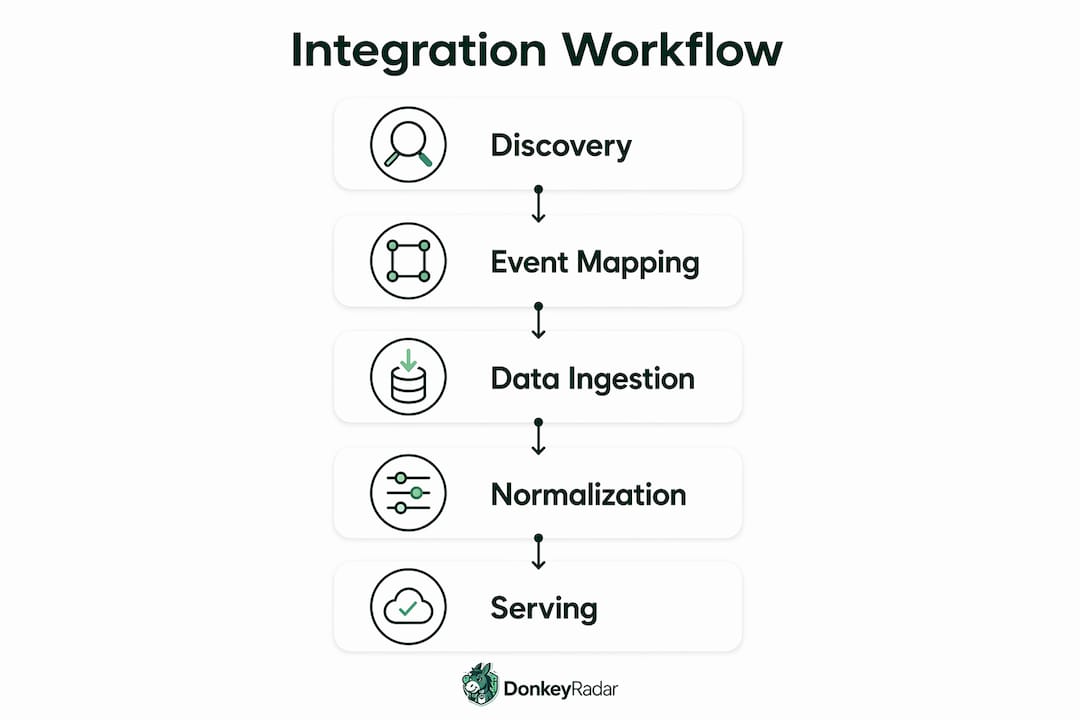
The four-phase integration workflow covers every production-grade implementation: discovery, event mapping, ingestion, and normalisation. Discovery pulls sports, leagues, and fixtures. Event mapping assigns stable internal IDs to each fixture and market. Ingestion fetches and stores the raw provider response. Normalisation converts it to your own schema.
A stable internal identifier mapping layer is essential because sportsbook providers vary widely in market naming conventions and team labels. “Moneyline,” “1X2,” and “match result” can all refer to the same market type depending on the provider. Build the mapping layer once, keyed on your own internal IDs, and treat every provider’s labels as input to translate.
Uniformly normalising market types and entity names across providers avoids brittle UI code and supports historical comparisons and settlement verification. Settlement is where small definitional differences become financial ones: voided markets, dead heats, and postponed events are handled differently across providers.
Integration do’s and don’ts:
- ✅ Decouple the fetch layer from the serve layer so provider downtime never blocks your UI
- ✅ Persist a timestamp and version marker with every stored snapshot
- ✅ Use Python or TypeScript SDKs where available to reduce boilerplate
- ❌ Never build your schema around a single provider’s field names
- ❌ Never assume settlement is a binary win/loss flag without reading the provider’s edge-case documentation
Pro Tip: For streaming integrations, implement reconnection with exponential backoff and heartbeat monitoring. A stream that silently stops delivering updates is worse than a slow poll that keeps working.
How does Donkeyradar use API data for lay betting signals?
Donkeyradar applies advanced algorithms to historical strike rates and live market prices to identify the weakest horse in a race, producing lay betting signals before races commence. The platform achieves a verified strike rate of over 85% by processing both historical data and real-time market movements rather than relying on either source alone. All signals are published before races start and results are continuously tracked and verified.
All signals are published before races and results are maintained in a verified public record. That transparency is the whole point: developers and bettors can audit the track record rather than take performance claims on trust.
Benefits for developers integrating Donkeyradar’s API:
- Pre-race lay signals with staking tier grading, ready to feed into automated trading software
- Direct Betfair Exchange links embedded in signal data for fast execution
- Real-time alerts via email and Telegram alongside API delivery
- Verified historical results available for backtesting and model validation
- Coverage across UK, Australian, and US horse racing markets
UK compliance and legal considerations for betting APIs
Any application that displays or redistributes betting odds in the UK must account for Gambling Commission regulations. The UK Gambling Commission licenses operators and, in some contexts, data suppliers. If your application facilitates actual betting rather than simply displaying data, a licence may be required.
Data redistribution rights are a separate concern from API access rights. Many providers grant access to data for internal use but require a commercial redistribution licence before you display odds publicly. Read the provider’s terms of service carefully before launching any consumer-facing product.
The UK’s Gambling Act 2005 and its ongoing review set the legal framework for remote gambling services. Developers building tools that interact with licensed sportsbooks should also consider the Advertising Standards Authority guidelines on how odds and promotions are presented. Profits from betting in the UK are tax-free for individual bettors, but commercial data services may have separate tax obligations depending on business structure.
How should you handle API versioning and updates?
Providers version their APIs with a path prefix such as /v3/ or /v4/. When a provider releases a new major version, the previous version typically remains available for a deprecation period, often three to six months, before being retired. Subscribe to the provider’s changelog or developer newsletter to receive advance notice.
Build your integration to fail gracefully on unexpected fields rather than throwing a parse error. Use permissive JSON deserialisation that ignores unknown keys, so a provider adding a new field to a response does not break your pipeline. Pin your SDK version in your dependency file and test upgrades in a staging environment before deploying to production.
Field renames and schema changes are the most disruptive updates. When a provider changes a field name, your normalisation layer absorbs the change in one place rather than requiring edits across your entire codebase. That is the practical payoff of the mapping layer described in the integration section.
Key takeaways
Integrating a betting API reliably requires a stable mapping layer, a decoupled fetch-and-serve architecture, and quota management from day one.
| Point | Details |
|---|---|
| Authentication security | Store API keys in environment variables or a secrets manager; rotate immediately if exposed. |
| Polling vs streaming | Use REST polling for pre-match data; switch to SSE or WebSocket for in-play markets where latency affects profitability. |
| Stable internal IDs | Map provider event and market labels to your own internal identifiers to withstand provider naming changes. |
| Persist before serving | Store normalised data locally so your application keeps serving odds during provider downtime or rate-limit throttling. |
| Donkeyradar strike rate | Donkeyradar’s algorithm delivers a verified strike rate of over 85% on lay signals, with all results publicly verified before races start. |
Put API data to work with Donkeyradar
Donkeyradar’s lay betting signals are built on exactly the kind of data pipeline this guide describes: real-time market prices, historical strike rates, and a normalised output that feeds directly into Betfair Exchange trading software. If you want to see what lay betting looks like when it is backed by verified data rather than gut feel, Donkeyradar’s free tier gives you daily signals with no subscription required. For developers, the API tier adds programmatic access to pre-race signals, staking grades, and a full verified results history. UK betting profits are tax-free, and every signal is published before the race starts.