← Blog · 📝 Article · 27 August 2026
Telegram vs email alerts: which channel wins on urgency?

Use Telegram for urgent, action-needed alerts; use email for low-urgency digests. That’s the core rule. But the rule only holds if you tune each channel properly and layer them by severity rather than relying on one to do everything.
Getting this wrong means two things happen at once: your Telegram channel gets muted because it fires on every minor blip, and your email alerts sit unread in an inbox because nobody treats them as urgent. The fix isn’t picking a winner. It’s routing:
- Time-sensitive, action-required events go to Telegram (or a pager)
- Status updates and monitoring context go to in-app or chat
- Summaries, reports and low-urgency notices go to email
Implementation matters as much as the decision. Bots, webhooks and message formatting determine whether your chosen channel actually gets glanced at in time. We’ll cover both further down.
Key Takeaways
Effective alerting pairs Telegram for urgent, action-required events with email for low-urgency digests, and only works when both channels are tuned to avoid fatigue.
| Point | Details |
|---|---|
| Match channel to urgency | Send action-required alerts via Telegram or paging; route summaries and reports to email. |
| Time-to-glance beats latency | An alert buried in an inbox is functionally slower than a push notification, regardless of delivery speed. |
| Tune before you scale | Apply thresholds and dedupe windows early, since email open rates sit far too low for anything urgent. |
| Route by team size | Solo teams can run on Telegram bots alone; larger teams need escalation layers and owner-based routing. |
| Build in fallbacks | Retries, rate-limit handling, and a fallback channel prevent silent alert failures. |
Table of Contents
- Telegram vs email alerts: a quick channel comparison
- Why speed-to-glance matters more than delivery latency
- How to stop alerts turning into noise
- Matching alert channels to team size and workflow
- Setting up Telegram bots and email webhooks properly
- The urgency matrix: a decision rule you can actually use
- How DonkeyRadar applies this to lay-betting signals
- Why urgency-first alerting beats channel loyalty
- Sources
Telegram vs email alerts: a quick channel comparison
Three channels dominate technical alerting: Telegram, email and in-app notifications. Each behaves differently under pressure, and picking the wrong one for the wrong job is how alert fatigue starts.
Telegram wins on speed-to-glance. Push notifications land on a lock screen within seconds, and because Telegram is mobile-native, your on-call engineer sees it whether they’re at a desk or in a supermarket queue. Email, by contrast, competes with dozens of other unread messages, so even instant delivery doesn’t guarantee instant attention.
In-app notifications sit in the middle. They’re contextual and useful for debugging within a dashboard, but they’re invisible the moment someone closes the tab. Wevion’s comparison of alert channels found Telegram best suited to urgent, action-needed events, with email reserved for periodic digests, and recommends layering channels by urgency rather than picking one.
Typical mapping:
- Cron job failures, production outages: Telegram
- Daily or weekly performance reports: email
- Live debug context while investigating an issue: in-app
Why speed-to-glance matters more than delivery latency
Delivery latency and time-to-glance are not the same thing. A message can arrive on a server in milliseconds and still take hours to be seen if it lands somewhere nobody checks. That gap between “delivered” and “seen” decides whether an alert is useful at all.
Telegram’s push-update mechanism controls exactly when notifications surface, not just when they’re sent. The TDLib notification API exposes hooks like updateNotificationGroup and updateHavePendingNotifications, letting clients group or briefly delay notifications to keep local state consistent. In practice, this means Telegram alerts can be batched intelligently rather than firing as a chaotic stream.
Email has no equivalent mechanism working in your favour. Industry benchmarks cited by Wevion put average marketing-email open rates in the low-to-mid 20% range. Even for transactional alerts, that behavioural lag is a structural limit: most emails simply don’t get opened close to when they arrive, which makes email a poor fit for anything genuinely time-critical.
How to stop alerts turning into noise
Every alerting system fails the same way eventually: too many notifications, too little discrimination between “this needs action now” and “this is background information.” Once that happens, engineers start ignoring the channel entirely, which defeats the purpose of having alerts at all.
Three failure modes show up repeatedly:
- Over-posting — every warning-level log line becomes a Telegram message, so the truly urgent ones drown in the scroll
- Repetitive pinging — the same unresolved issue re-alerts every few minutes instead of escalating
- Inbox clutter — email digests mix critical failures with routine status updates, so nobody scans them properly
The fix is threshold discipline. Set a minimum severity bar before anything reaches a human channel, use dedupe windows so a flapping service doesn’t spam the same alert repeatedly, and escalate unresolved issues rather than re-sending the identical message. If an alert has fired three times unresolved, it should change channel or severity, not just repeat.
Routing discipline matters just as much as thresholding. Scope alerts to the person who owns that system, and separate channels by severity so a critical outage doesn’t sit in the same feed as a minor disk-space warning.

Pro Tip: If your Telegram channel has more than a handful of unread messages by lunchtime, your thresholds are wrong, not your team’s attention span.
Matching alert channels to team size and workflow
A two-person startup and a fifty-engineer platform team need different alerting patterns entirely, and copying one team’s setup onto the other usually creates either noise or blind spots.
For solo developers and small teams, Telegram’s low setup cost and immediacy are hard to beat. One developer account describes replacing a paid observability stack with a Telegram bot for production alerts, at effectively no cost. It works well precisely because small teams don’t need dashboards or error grouping. They need someone to see a failure fast.
Larger teams need more structure:
- Routed channels per service or team, so alerts reach the owner, not everyone
- Escalation layers: unacknowledged critical alerts move from chat to paging after a set window
- Digests for anything that doesn’t need immediate action, sent by email on a schedule
Private pings suit individual accountability; group channels suit shared visibility; email threads work for anything that needs a paper trail. A dedicated paging service becomes worth the cost once missed alerts start carrying real financial or reputational risk.
Setting up Telegram bots and email webhooks properly
Building reliable alerts is mostly about defaults, not clever engineering. Get the structure right once and both channels stay trustworthy for years.
For Telegram, keep bot messages short and scannable: a headline, a one-line summary, and a link or inline button for the action itself (acknowledge, mute, view logs). Avoid dumping full stack traces into the message body. A simple setup using a bot token and a curl call can cover most production needs within minutes, though it won’t give you dashboards or grouped error views the way a dedicated observability tool would.
On the transport layer:
- Use webhooks for event-driven alerts, since they fire the moment a condition triggers
- Use SMTP or an email API for receipts, summaries and anything that doesn’t need instant delivery
- Build in retries with backoff so a temporary network blip doesn’t silently drop an alert
- Add a fallback channel: if Telegram delivery fails or a rate limit kicks in, fall back to email or a paging escalation automatically
Pro Tip: Rate limits catch teams out more than outages do. Telegram bots have message-frequency caps, so a burst of simultaneous failures can throttle your own alerting exactly when you need it most.
The urgency matrix: a decision rule you can actually use
Cut through the debate with a simple three-tier matrix:
- Immediate action required → Telegram or a paging service. Production is down, a security event fired, money is at risk.
- Monitor, don’t panic → in-app or chat. Something’s degraded but self-healing or non-critical.
- No action needed yet → email digest. Daily summaries, weekly performance reports, informational logs.
Once you’ve assigned channels, test the setup rather than trusting it blindly. Track time-to-first-read (how long between send and open), action rate (did the alert lead to a response), and false-positive rate (how often the alert fired for nothing). If time-to-first-read on your “urgent” channel is measured in hours, it’s not actually your urgent channel.
Add a paid paging tier only once missed alerts start costing more than the subscription would. For a two-person team, that threshold arrives far later than most people assume.
How DonkeyRadar applies this to lay-betting signals
Pre-race lay betting is a live case study in urgency-first design. Odds move fast on the exchange, and a signal that arrives ten minutes late is worthless.
Donkeyradar publishes pre-race lay signals over Telegram precisely because a lock-screen push beats an unread email when a race is minutes from post time. Verified results and staking-tier grading are maintained transparently alongside the signals themselves, so users can check performance rather than take strike-rate claims on trust.
- Real-time Telegram alerts map to the “immediate action” tier of the urgency matrix
- Staking tiers and direct Betfair Exchange links reduce the steps between alert and action
- Verified results provide the accountability layer email digests would otherwise carry
Why urgency-first alerting beats channel loyalty
Most alerting debates get stuck arguing which channel is objectively better, and that framing misses the point entirely. Telegram isn’t superior to email. It’s faster to glance at and worse at holding a paper trail. Email isn’t obsolete. It’s just badly suited to anything time-critical.
The conventional advice, pick one channel and standardise on it, is where most teams go wrong. Standardisation feels tidy, but it ignores that urgency isn’t uniform across the alerts a system generates. A cron failure and a weekly performance summary have nothing in common except that they both technically qualify as “notifications.”
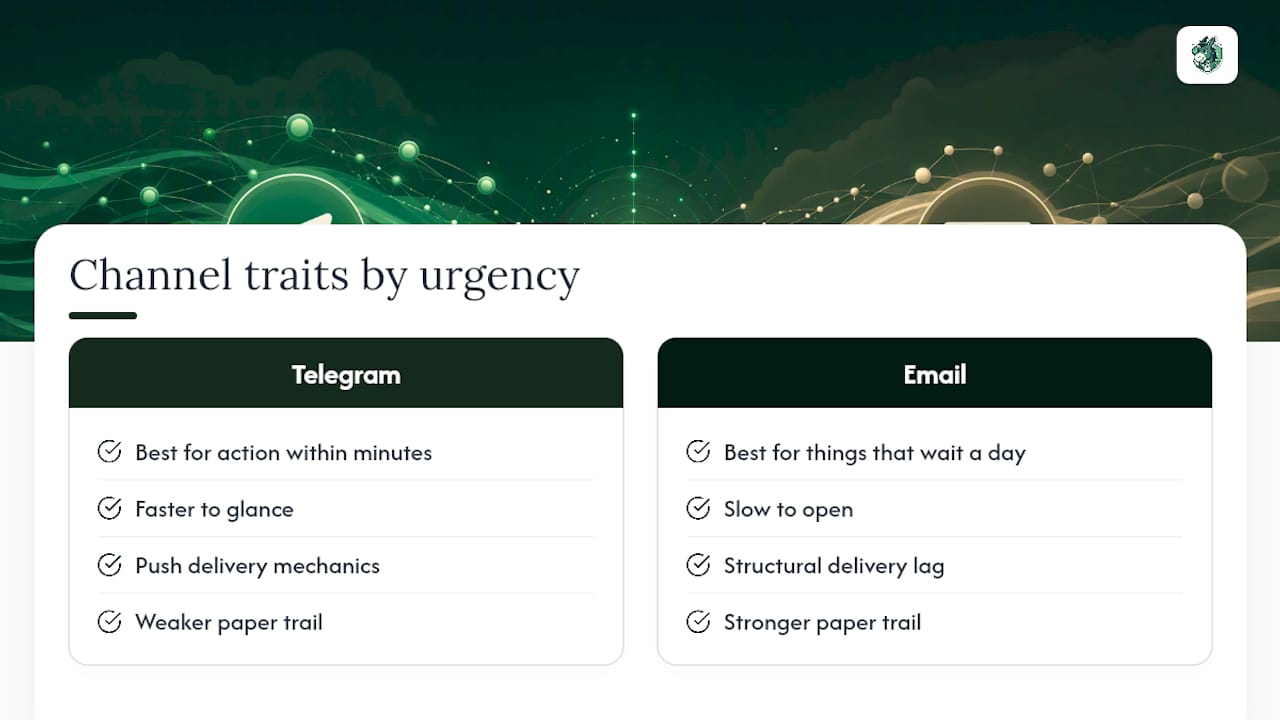
What the evidence in this piece actually supports is layering by severity, not channel preference. Telegram’s push mechanics make it the right default for anything needing action within minutes. Email’s structural lag, visible in how rarely messages get opened quickly, makes it right for anything that can wait a day. DonkeyRadar’s own use of Telegram for pre-race signals isn’t a stylistic choice. It’s a direct response to how fast exchange odds move.
If you take one thing from this: audit your current alerts by how urgent they actually are, not by which channel is easiest to set up. That mismatch is where most alert fatigue starts.
— Donkey
Sources
- Push updates — Telegram core API
- How I replaced Sentry and the rest for Good: The $0 Telegram Alerting Hack — DEV Community